
I’ve been doing some projects with Alpine and LiveView recently. And here’s my experimenting and debugging process for your problem. Hope that this can help you.
First, let’s take a closer look at the differences of the rendered html between the function components and thje inline content.
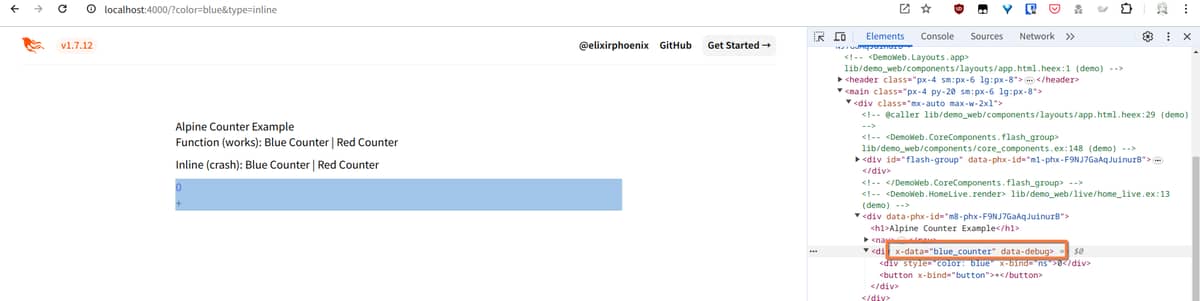
From the rendered results shown in the images below, you can see that the rendered component has a data-phx-id attribute in the component root element, while the rendered inline content doesn’t have this attribute. Here I’ve also added a data-debug attribute to the root element of the Alpine component (the element that has x-data attribute) to easily identify it later.


Next, we need to have a general idea of how LiveView DOM patch works. It uses the morphdom library under the hood for doing DOM mutations.
Given an existing DOM tree that is already rendered in the browser and a new updated HTML fragment sent from the server, morphdom will morph the existing DOM to match the content of the newly updated HTML fragment.
During the process, morphdom will try to reuse existing DOM element and only create new DOM nodes when needed, rather than simply replacing the whole old DOM tree with a completely newly created one.
It supports custom lifecycle hooks so that we can inspect the morphing process. Add the following code for debugging the morph process.
let liveSocket = new LiveSocket("/live", Socket, {
	dom: {
		onNodeAdded(node) {
			console.log("node added: ", node);
		},
		onBeforeElUpdated(from, to) {
                        // check if the element is an Alpine component root
			if (from.dataset.debug != null) {
				console.log("node updated: ");
				console.log(from.outerHTML);
				console.log(to.outerHTML);
			}

			if (from._x_dataStack) {
				console.log("datastack cloned");
				Alpine.clone(from, to);
			}
		},
	},
});
For the component type, switch between blue and red, and you can see that the whole component is always recreated. Each DOM node of the component is created and added to replace the old DOM content.

Switch from the component type to inline type, and you can see that all nodes are recreated too.

For the inline type, switch from blue to red, and you can see that the outermost div element is reused through the morph process. It is morphed from <div x-data="blue_counter" data-debug=""> to <div> with only attributes changed, there’s no new node created for it. And so far, everything works fine.

However, if we switch from red to blue, then error happens. To better demonstrate the morphing process, here I’ve also added the data-debug attribute to the outermost div element of the red counter component.

From the logging results above, we can see that two div elements were reused, and the error happens when dealing with the second node updates. From the trace stacks, the error happens when calling Alpine.clone() at the second DOM node update.


Then let’s have a look at what Alpine.clone() actually did. Alpine stores reactive states in the _x_dataStack property of a DOM element. So it first copy all the reactive states from the old element to the new element. After that, it’s calling initTree() on the new element. This function basically scans and initializes all the x- prefixed Alpine directives throughout the whole DOM tree.

And then let’s get back to the debugging results where error happened.
During the first node update, the outermost <div> element (the from param of onBeforeElUpdated ) is morphed to <div x-data="blue_counter">. But the from element is not an Alpine component root, which has no _x_dataStack property so that it fails if (from._x_dataStack) check. And Alpine.clone() is not called, the x-data="blue_counter" directive in the new element is not initialized.
During the second node update, the element is morphed to <div x-bind="ns">. But its parent element <div x-data="blue_counter"> didn’t get a chance to initialize the Alpine data, so it cannot find the ns binding from its root. And that’s why the error says Alpine Expression Error: ns is not defined.
The cause of the Alpine error should be clear now. Then let’s talk about why the component and inline rendering has different behavior when doing DOM patching. Why does morphdom always create new nodes when rendering component and why does it try to reuse existing nodes when rendering inline content?
morphdom also has a getNodeKey() option:
getNodeKey (
Function(node)) - Called to get theNode's unique identifier. This is used bymorphdomto rearrange elements rather than creating and destroying an element that already exists. This defaults to using theNode‘sidproperty. (Note that form fields must not have anamecorresponding to forms’ DOM properties, e.g.id.)
If you have experience in React, Vue or other frontend libraries, you may be familiar with the key attribute when doing list rendering. And the getNodeKey() function for morphdom works in a similar way.
And the implementation of this option in LiveView is shown below. It is using the element id or an attribute named PHX_MAGIC_ID as the node key. And PHX_MAGIC_ID is a constant with value data-phx-id. And that’s just what we saw in the rendered component in the beginning. Also, this is why it works if you manually add an id attribute to the root element.
https://github.com/phoenixframework/phoenix_live_view/blob/v0.20.14/assets/js/phoenix_live_view/dom_patch.js#L105
As for the "r": 1 field from the diff message, it is marked as reply in the source code. And I’m not sure what this field means, either. But I think it is not related to your problem, I guess?
https://github.com/phoenixframework/phoenix_live_view/blob/v0.20.14/lib/phoenix_live_view/diff.ex#L13
And this is all the explanations to your problem. Hope that I made it clear enough for you to understand. 






















