Logout buttons for Bootstrap or Bulma <nav> elements

I can’t get a Logout button (or plain link) to look good in either a Bootstrap or Bulma navbar. My general question is: how do you make a <form> that wraps an <a class="button"...>...</a> render the same as the <a> alone?


Per the Phoenix book, logging out is done with:

link("Log out", to: session_path(conn, :delete, current_user)

… producing something like:

<form action="/sessions/4" class="link" method="post">
      <input name="_method" type="hidden" value="delete">
      <input name="_csrf_token" type="hidden" value="JBxGTxkhJX09aUM+IjEVNwQHFF8jEAAAbPi+AtgRE+5sMuDRLfFmjg==">
      <a data-submit="parent" href="#" rel="nofollow">
      Log out</a>
</form>

I can’t figure out how to wrap this or adorn it with class= such that it works across devices.

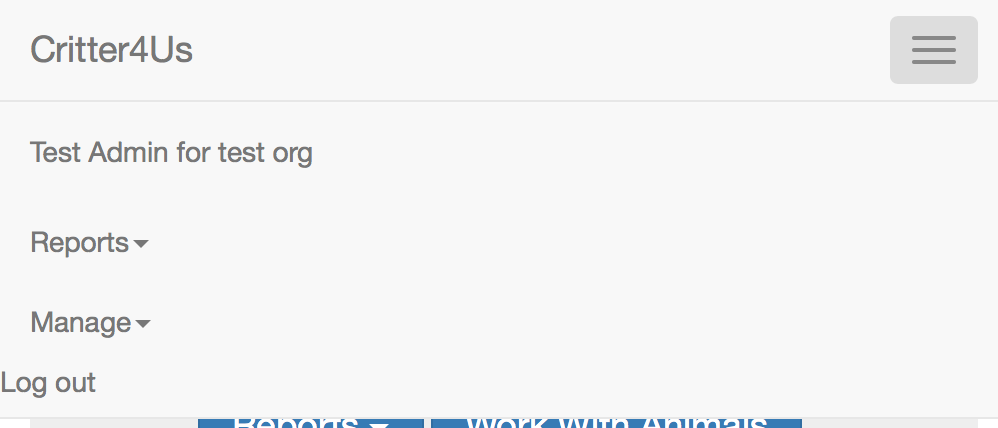
For example, I can get Logout to look right with Bootstrap in a wide window, but I get a misaligned entry in a phone-sized window:

In Bulma, which seems pretty nice, the result of:

        <span class="nav-item">
          <form action="/sessions/4" method="post">
            <input name="_method" type="hidden" value="delete">
            <input name="_csrf_token" type="hidden" value="JBxGTxkhJX09aUM+IjEVNwQHFF8jEAAAbPi+AtgRE+5sMuDRLfFmjg==">
            <a class="button" data-submit="parent" href="#" rel="nofollow">
              Log out
            </a>
          </form>
          
          <a class="button is-info">
            Sign up
          </a>
        </span>

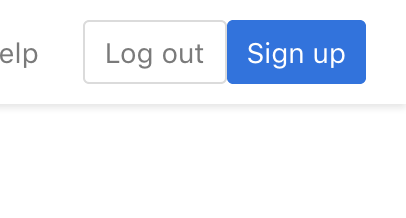
… is buttons with no space between them in wide view:

… whereas two plain <a class="button"...> tags have a nice gap between them. (There’s a different problem in layout view.)

I’m getting too close to giving up on any server-side rendering and doing everything in Elm on the client side. Save me from myself!

Re Bootstrap, what does your HTML look like?

Re Bulma, there is no space between the buttons because the rule that adds it expects .nav-item .button + .button:

.nav-item .button + .button {
    margin-left: 10px;
}

Something like this should work:

<a class="button is-info" style="margin-left: 10px;">Sign up</a>

Thanks. That fixes the buttons when the media is desktop, but when it’s phone-like narrow, the form button doesn’t expand to fill the width as the non-form button does.

Which is OK. I was mainly curious to see whether there’s a documented set of tricks that I could use. I suspect that I’ll just have to become more competent in CSS.

This may not help you in this scenario, but I discovered yesterday that you can supply a block to the link helper function. This allows you to provide any HTML within the generated form and link element.

   <%= if @current_user do %>
      <span class="nav-item">
        <%= link to: auth_path(@conn, :delete), method: :delete, class: "button" do %>
          Log out
        <% end %>
      </span>
    <% end %>

Not sure if that would help. The key issue, it seems to me, is that link sometimes expands into a simple <a> tag and sometimes into a <form> that contains <a> tags. Things like class attributes passed to link are attached to the <a>, but sometimes they should be attached to the <form> for layout to work right.

Did you know that you can customize the form? For example, this:

<%= link("Delete",
    class:  "btn btn-danger btn-xs",
    data:   [confirm: "Are you sure?"],
    form:   [foo: "bar"],
    method: :delete,
    to:     match_path(@conn, :delete, match)
) %>

Produces this:

<form action="/matches/272" class="link" foo="bar" method="post">
    <input name="_method" value="delete" type="hidden">
    <input name="_csrf_token" value="NTBAERxxSicQAWcQEnQKMQRdNx4GAAAAsv5csE/fCpUdeMbekrrK1w==" type="hidden">
    <a class="btn btn-danger btn-xs" data-confirm="Are you sure?" data-submit="parent" href="#" rel="nofollow">Delete</a>
</form>

Yes. The difficulty is that doesn’t attach classes to the <form>. However, wrapping it in an appropriate <span> is doing the trick:

      span class: "nav-item is-tab" do 
        link("Logout", to: v2_session_path(conn, :delete, v2_current_user),
          method: "delete", class: "button button-primary nav-item")
      end

It will. :slight_smile:

I used form: [foo: "bar"] in that example but form: [class: "is-tab nav-item"] works, too.

Well, whaddya know. Thank you!