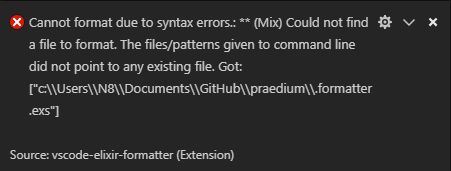
Mix format works fine if run from the cmd. I’ve followed this to facilitate the implementation into VSC which involves downloading an extension called vscode-elixir-formatter. When I save however:
I have a .formatter.exs in my project directory which looks like:
[
  import_deps: [:ecto, :phoenix],
  inputs: ["mix.exs", "*.{ex,exs}", "priv/*/seeds.exs", "{config,lib,test}/**/*.{ex,exs}"],
  subdirectories: ["priv/*/migrations"]
]
and I’ve checked all the boxes in the VSC user formatter settings. Do I need to tell vscode somehow where my .formatter.exs file is?
blatyo
February 8, 2019, 2:13am
2
EDIT: This extension is recommended for vscode now: ElixirLS Fork: DEPRECATED (use original extension) - Visual Studio Marketplace
I’d recommend this extension instead: ElixirLS: Elixir support and debugger - Visual Studio Marketplace
It’ll do formatting for you among other things. Also, should be able to detect your .formatter.exs without any config.
I also recommend ElixirLS. But that alone will not format on save; in my experience.
To get that, just add this line to your settings.json:
"editor.formatOnSave": true
You could also use the extension emeraldwalk/vscode-runonsave GitHub - emeraldwalk/vscode-runonsave: Visual Studio Code extension to run commands whenever a file is saved. · GitHub settings.json:
  "emeraldwalk.runonsave": {
    "commands": [
      {
        "match": "\\.exs?$",
        "isAsync": false,
        "cmd": "cd ${workspaceRoot} && mix format ${file}"
      }
    ]
  },
This could also be useful for other commands which you want to run automatically on save.
Thank you very much for your comment! Although I am currently using ElixirLS, this looks like a fantastic extension and it seems very useful for lots of things